
Need
Adding a copilot-instructions.md file in the VS Code workspace is a simple but effective way to improve GitHub Copilot's understanding of Semarchy projects. By directing Copilot to official documentation, reference implementations, and approved validation practices, developers can obtain higher-quality suggestions and maintain consistency across their models.
A copilot-instructions.md file helps Copilot by:
Pointing it to the official Semarchy documentation.
Directing it to examples from Semarchy accelerator projects.
Providing troubleshooting resources.
Enforcing the correct model validation workflow.
Reducing hallucinations and improving the relevance of generated code and models.
Solution
Create the file
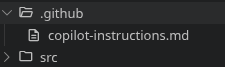
In a .github folder, create a file named copilot-instructions.md
Add the following content:
---
applyTo: "src/**/*.seml"
---
All technical documentation can be found online.
Use the https://docs.semarchy.com/llms.txt file as a reference for the structure and content of the documentation.
Use this file to browse the online documentation and to find the correct seml attributes to use in your model.

For example of models, relationships, entities, applications, forms, collections, and steppers, you can browse the github repository https://github.com/semarchy/sdp-accelerators (web browsing only, do not clone).

For specific troubleshooting, you can browse knowledge base articles here: https://support.semarchy.com/support/solutions/43000375116

After edition, validate the model using the following command: `sem-design dm model build --root-folder <root of the model>`.
Do not run other `sem-design` commands.
Understand the Configuration
- applyTo
This setting ensures that the instructions are only applied when Copilot is working on SEML model files located under the src directory.
- Official Documentation Source
The llms.txt file acts as an AI-friendly entry point to the Semarchy documentation. It helps Copilot discover the appropriate documentation sections and locate the correct SEML attributes and syntax.
- Reference Implementations
The accelerator repository contains practical examples.
- Validation
The instruction explicitly tells Copilot to validate models using the build command after modifications. It is assumed that the design-cli is installed and available on the machine.
Developer Responsibility
The copilot-instructions.md file is intended to improve the relevance and accuracy of GitHub Copilot suggestions by providing project-specific context and trusted sources. However, these instructions do not guarantee that the generated content is correct, complete, or suitable for a given use case.
Developers remain fully responsible for reviewing, understanding, and validating any content produced by AI-assisted tools before incorporating it into a project. AI-generated SEML files must be treated as suggestions.
Users should be adequately trained and qualified to design and maintain DM models before relying on AI-assisted generation. The generated content should always be reviewed against project requirements, official Semarchy documentation, and established governance standards.
Model validation using the recommended build process is a necessary verification step, but successful validation alone does not guarantee that a model is functionally correct or aligned with business requirements. Final responsibility for the quality, correctness, and maintainability of the model remains with the developer.
The provided copilot-instructions.md is only an example of what can be done, feel free to adapt the instructions to your specific needs.