This article explains how to include a header parameter in a WebService HTTP REST, and to reverse it on the
metadata to obtain a dynamic header parameter that can be modified in a mapping.
Need
How can I add a header parameter to a WebService HTTP REST and ensure it can be dynamically modified in mappings?
Summarized Solution
You can create a dynamic header parameter in the request parameters section and reverse it in the metadata for future mappings.
Detailed Solution
- In the request parameters section, click the + button to define a new parameter.
- Specify the parameter type as
HEADER, along with its name and value. The value can be a test value used during a test invocation to retrieve the Web Service response. - The parameter will be added as an HTTP header when invoking the Web Service, but it will not be stored in the metadata.
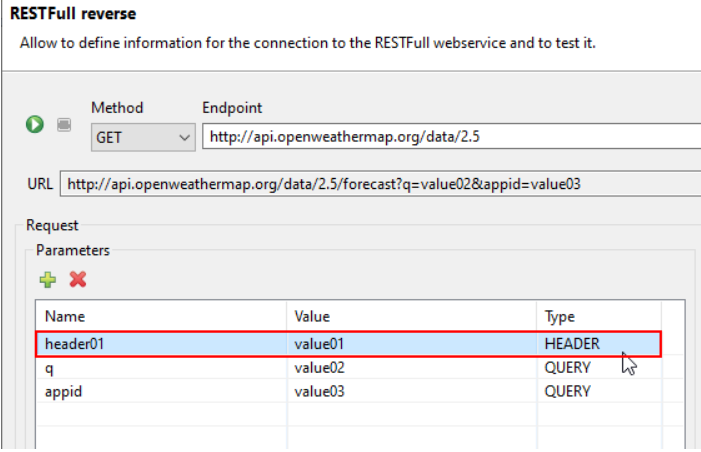
- This HTTP header will be reversed in the Input Metadata of the Web Service, allowing you to specify it dynamically in future mappings.
Reverse the data in metadata
- After reversing the data into the metadata, you will retrieve the header parameter:

Use the header parameter in a mapping
You can easily assign a new value to this header parameter in a mapping.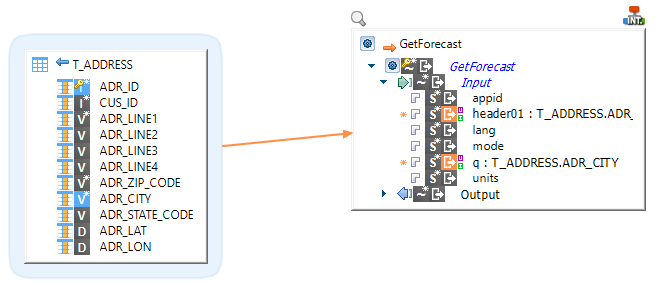
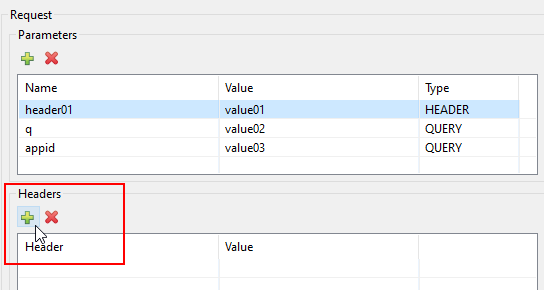
Create a static header parameter
If you want to define an HTTP header with a fixed value that will be transmitted with each invocation, you can add a header parameter like this: